Free LUTs: 16 colour grading looks
Sixteen .cube LUTs for video and photos, from warm film to moody black and white. Free for any use, no sign-up.
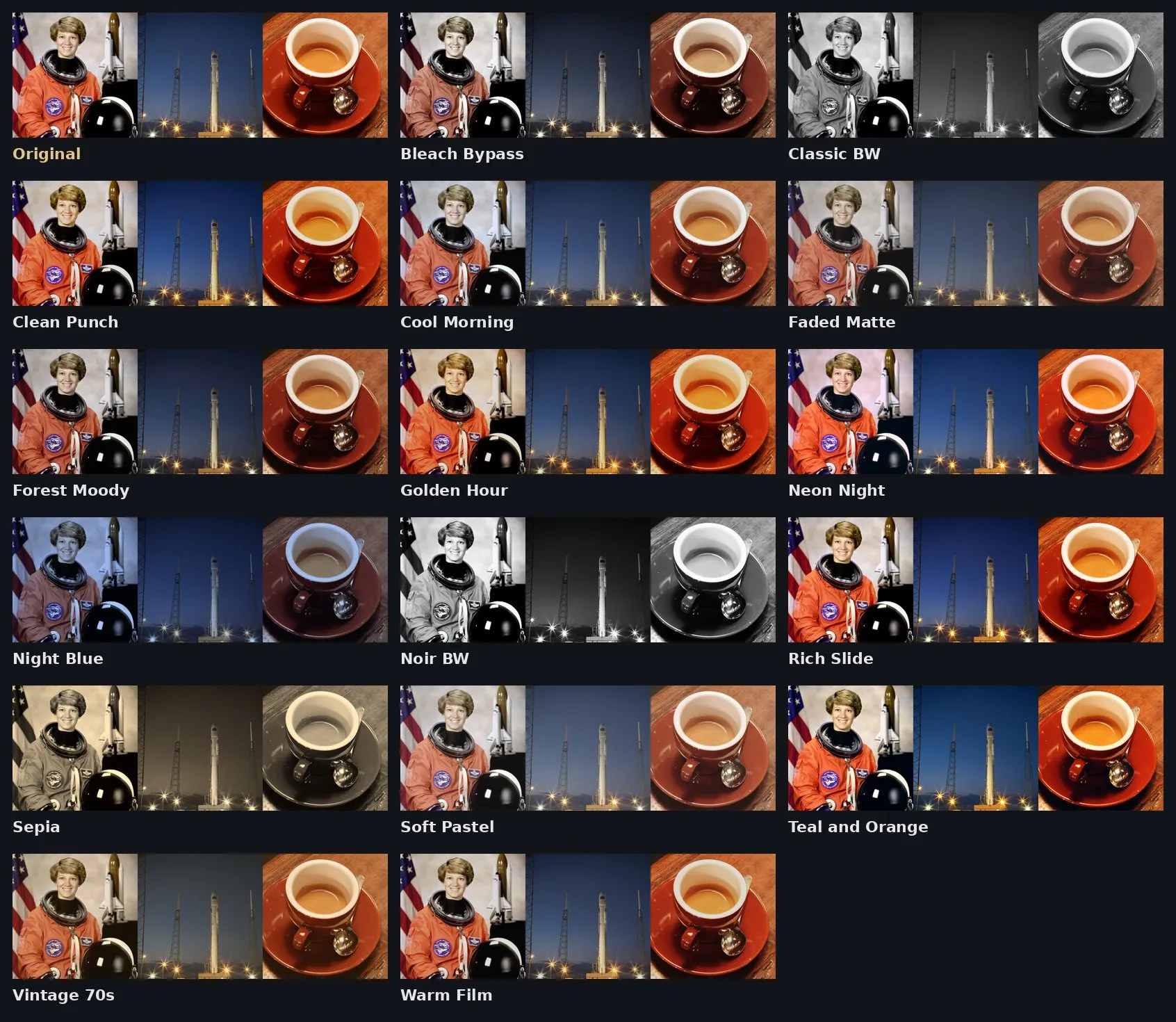
Preview on public-domain photos from NASA and the scikit-image project.
What's in the pack
16 looks for normal, everyday footage: Warm Film, Teal and Orange, Cool Morning, Golden Hour, Faded Matte, Forest Moody, Classic BW, Noir BW, Vintage 70s, Bleach Bypass, Clean Punch, Night Blue, Soft Pastel, Neon Night, Rich Slide and Sepia. Each one is a standard 33-point .cube file, the format almost every editor reads.
They are made for Rec.709 video, which is what phones, webcams, action cameras and most cameras record unless you switch to a log profile. Shooting in log? Convert it to Rec.709 first, then add the look on top.
How to use a LUT
- Clipabay, free in your browser: open a clip in the video editor, go to Look, press Import LUT (.cube) and set the strength.
- Premiere Pro: Lumetri Color › Creative › Look › Browse.
- DaVinci Resolve: Project Settings › Color Management › Open LUT Folder, copy the files in and press Update Lists. Then right-click a node › LUTs.
- Final Cut Pro: add the Custom LUT effect and choose the file.
- CapCut desktop: Adjust › LUT › Import.
- OBS: right-click a source › Filters › Apply LUT.
- Photoshop: add a Color Lookup adjustment layer and load the file under 3DLUT File.
Tip: a LUT works best on footage that is already exposed and white-balanced well. Fix that first, then add the look, and try it at 60 to 80% strength.
Can I use them commercially?
Yes. Everything in this pack is released under CC0, which means public domain. Use it in YouTube videos, client work, games, apps, released music and anything you sell. You don't have to credit us, though a link back is always appreciated. We made every file ourselves, so there is nothing to clear.
More free downloads: light leak overlays, drum kit, ringtones and sound effects.
Questions
Are these LUTs really free?
Yes. All 16 are free to download and released as CC0 (public domain), so you can use them in paid work without credit.
Do they work in Premiere Pro, DaVinci Resolve and Final Cut?
Yes. They are standard 33-point .cube files, which Premiere, Resolve, Final Cut, CapCut desktop, OBS, Photoshop and Clipabay all read.
Can I use them on log footage?
They are made for Rec.709 footage. For log, first convert it to Rec.709 with your camera maker’s conversion LUT, then add one of these looks.